
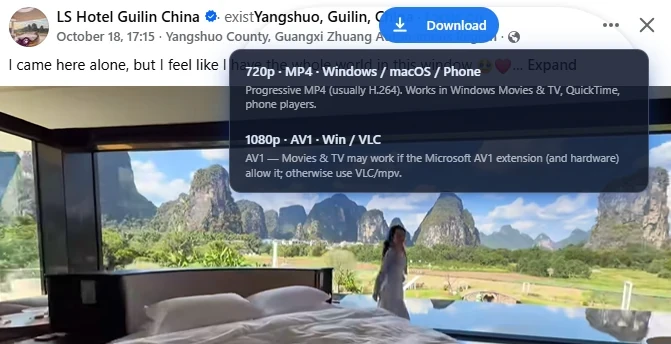
Why the menu shows more than one file
Related: Facebook Video Downloader · Getting started · Is it safe?.
Facebook often publishes the same post as several streams. Resolutions differ (360p, 720p, 1080p), and codecs differ too. Lonkin’s Chrome extension reads what the page already exposes and lists those options before you save — so you are not stuck with a file your phone cannot play.
This guide is about choosing well, not about bypassing privacy. You can only download media from pages you can already open while logged into Facebook.
MP4 (progressive) vs AV1
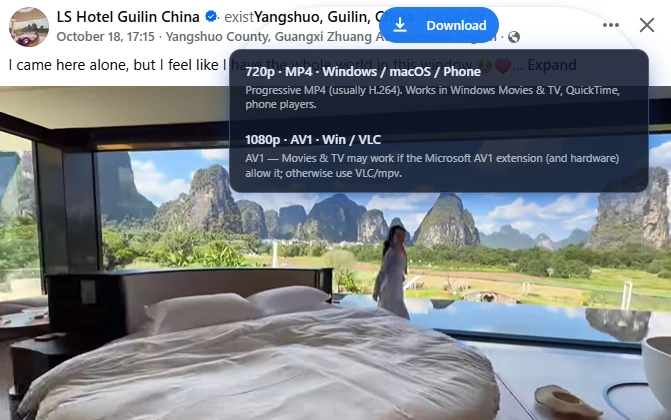
Progressive MP4 (usually H.264) is the safe default. It works in Windows Movies & TV, QuickTime, iOS, Android, and most editors. If you need one file that “just opens,” pick MP4.
AV1 packs similar picture quality into a smaller file when Facebook offers it. Playback is pickier: Windows Movies & TV may need Microsoft’s AV1 extension and recent hardware; otherwise use VLC or mpv. If your workflow is “send to phone,” AV1 is often the wrong tradeoff.
A simple decision rule
- Phone, chat, or school/work laptop with no extra apps — choose the highest progressive MP4 you see (often 720p).
- Archive on a PC where you already use VLC — highest AV1 is fine.
- Unsure — download MP4 first. Re-download AV1 only if you care about disk space.
A higher number is not automatically better. 1080p AV1 that stutters on your device is worse than a smooth 720p MP4.
Make higher qualities appear
- Use desktop Chrome on facebook.com (not a random paste site).
- Let the video play for a second so higher streams can show up.
- Stay on a stable connection; thin networks sometimes only expose lower rungs.
Albums are different
Multi-photo posts use Download all, not the codec menu. See how to download Facebook photo albums and the album landing page.
FAQ
Will the extension re-encode my file?
It saves the stream Facebook already prepared. You pick among exposed options; you are not uploading the video to Lonkin servers.
Is AV1 “safer”?
No. Safety is about permissions, local download, and copyright — not the codec. See our safety guide.
Install Facebook Video Downloader from the Chrome Web Store, open a video you can view, and pick the row that matches your device.